
Okay, so you've seen a 3D printer in action. Maybe it's whirring away, building some futuristic gadget or a tiny, adorable space explorer. It looks like magic, right? A digital design just... appears! But hold on, what's the secret sauce? What's the unsung hero working behind the scenes? Enter the glorious, often misunderstood, and frankly, super fun world of slicing!
What Even IS Slicing?
Imagine you've designed the most epic, fantastical dragon you can think of on your computer. It's magnificent! It's 3D! But here's the kicker: your 3D printer isn't some super-genius wizard that understands "dragon." It only knows one thing: "Move here, squirt plastic. Move there, squirt more plastic." Think of it like a meticulous, layer-by-layer builder.
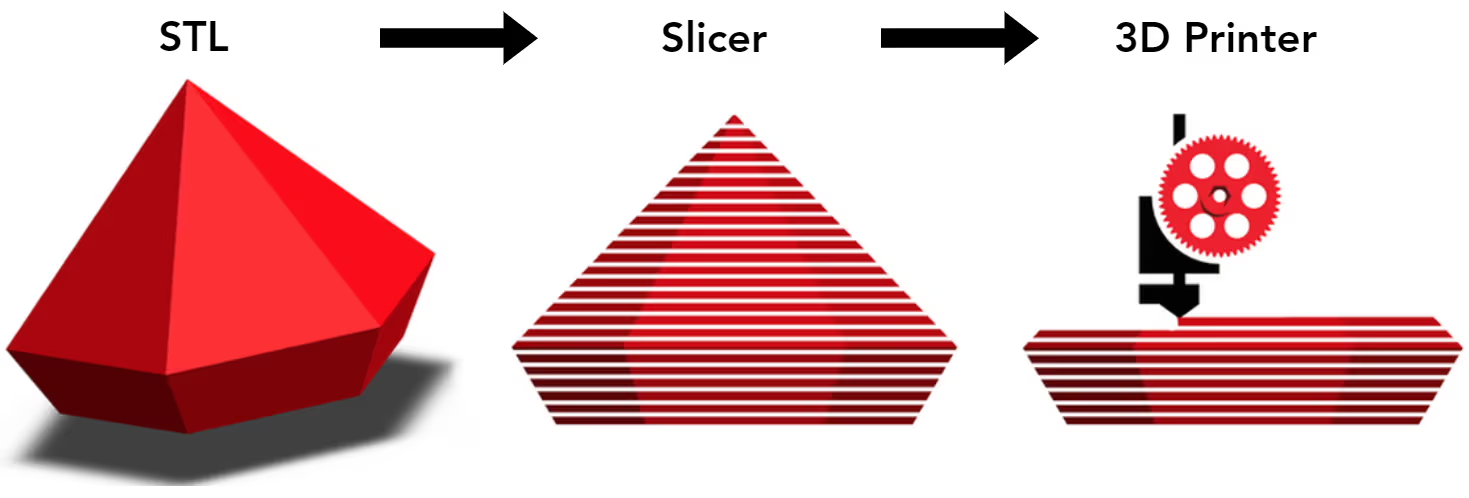
Slicing is the awesome process that takes your glorious 3D design and chops it up, digitally, into hundreds (or even thousands!) of paper-thin layers. Like a digital deli slicer for your virtual creation. Poof! From one big 3D model to a stack of super-thin 2D blueprints. Each layer is a tiny instruction manual for the printer.
Why Do We Need This Digital Chopping Block?
Because your printer isn't a mind-reader! It can't just look at a whole dragon and know how to build it. It needs step-by-step instructions. Slicing breaks down that big, beautiful 3D dream into digestible, flat cross-sections. It's like giving a LEGO builder a picture of the finished castle versus giving them the instructions for each individual brick placement. Which one do you think works better?
This isn't just about layers, though. Oh no, it's way more interesting!
The Slicer: Your Print's Personal Architect and Chef!
The software that does all this magic is called a slicer. Think of it as your print's personal architect, engineer, and maybe even a Michelin-star chef, all rolled into one! Popular slicers like Cura, PrusaSlicer, or Simplify3D are where the real fun begins. This is where you, the master builder, get to pull all the levers!
The slicer doesn't just create layers. It generates something called G-code. This isn't some secret spy language, though it looks a bit like it! G-code is the printer's native tongue. It's a list of commands: "Go to X 10, Y 20, Z 0.2. Extrude plastic. Move to X 10.5, Y 20, Z 0.2. Extrude more plastic." And so on, for millions of lines. It’s like a super detailed dance routine for your printer's nozzles!

Quirky Facts and Why It’s So Fun!
1. The Invisible Scaffolding (Supports!):
Ever tried to build a bridge in mid-air without anything underneath? It just falls, right? 3D printers have the same problem with "overhangs." If a part of your dragon is supposed to float in the air, the plastic would just droop into spaghetti. That's where supports come in! The slicer intelligently adds temporary, break-away structures to hold up those airborne bits. It’s like building invisible scaffolding that you snap off later. So satisfying!
2. The Inner Guts (Infill!):
Does your dragon really need to be 100% solid plastic? Probably not! That would take forever and use a ton of material. The slicer lets you choose how much infill your print needs. Picture a honeycomb, a grid, or even a gyroid pattern inside your print. This internal structure gives strength without wasting material. It's a clever trick, like a secret, hidden skeleton! You can even change the infill pattern for different strengths or weights. Mind blown!

3. The Golden Rules (Print Settings!):
This is where you become the director! The slicer lets you tweak a zillion settings:
- Layer height: Do you want super fine details (thin layers) or a faster print (thicker layers)?
- Print speed: Speedy Gonzales or slow and steady wins the race?
- Temperature: Too hot, and plastic oozes. Too cold, and it won't stick. The slicer helps you find that Goldilocks zone!
- Retraction: This tiny movement pulls the filament back a bit to prevent dreaded "stringing" between parts. It's like a quick sip of soda to keep from dribbling!
Every single one of these choices, made in the slicer, directly impacts the quality, strength, and even the look of your final 3D print. It's not just a button you press; it's an art form!
Why Slicing Is Just Plain COOL
Slicing is the ultimate bridge between your imagination and the physical world. It’s where your digital dreams get translated into tangible reality. When you hit that "Slice" button, you're not just running software; you're orchestrating a complex dance of precision and physics.
And here's the best part: it's incredibly empowering! Want to make a part stronger? Tweak the infill. Want a smoother surface? Fine-tune the layer height. Every problem has a slicer solution. It's a constant puzzle, a creative challenge, and a satisfying journey of turning zeroes and ones into something you can hold in your hand.
So next time you see a 3D print emerge from a machine, give a little nod to the unsung hero: slicing. It's not just a step; it's the magic behind the curtain, and it’s genuinely a blast to explore!