
Okay, picture this: I once had this brilliant idea for a prop. You know, one of those cool sci-fi gizmos with glowing, transparent parts that just scream "future tech." Naturally, my first thought was, "I'll just 3D print it!" I confidently loaded up my printer, hit go, and a few hours later, pulled off... a very opaque, somewhat frosted, definitely not clear chunk of plastic. It was a moment of pure, unadulterated reality hitting me square in the face. My futuristic prop looked like it had been salvaged from a swamp.
That little mishap got me thinking, and probably many of you too, right? We see all these amazing clear objects in the world – lenses, windows, display cases – and if we can 3D print nearly anything else, surely we can 3D print something that lets light shine straight through? Can you actually 3D print clear plastic, or is it just another one of those elusive holy grails of additive manufacturing, like printing a perfectly working espresso machine?
So, Can You 3D Print Clear Plastic? (The Short Answer)
The quick and dirty answer is: yes, but it's complicated. It's less like pressing a button and more like embarking on a mini-quest that often involves a lot of elbow grease, specific materials, and a fair bit of patience. Think of it as trying to make a clear glass of water, but starting with a muddy puddle. You can get there, but it takes some serious filtering and refining.
The Nitty-Gritty: Materials Matter
FDM: The Workhorse (and the Wobbly Bit)
If you've got a standard FDM printer (the one that squirts out melted plastic in layers), you've probably dabbled with filaments like PETG or PLA. Some manufacturers sell "clear" versions of these. And yes, you can print them.
But here's the kicker: out of the box, your FDM clear prints are almost always going to be translucent, not transparent. Why? Those lovely layer lines, air bubbles trapped in the filament, and even the internal structure (infill) all scatter light. It's like trying to see through a stack of microscopic corrugated cardboard. You know what I mean, right?

You can optimize your print settings a bit – slower speeds, higher temperatures for better layer adhesion, 100% infill, and specific nozzle sizes can help reduce some of the haziness. But even then, you'll be left with something that looks more like frosted glass than crystal. Still, it's a start!
Resin (SLA/DLP): The Slicker Sibling
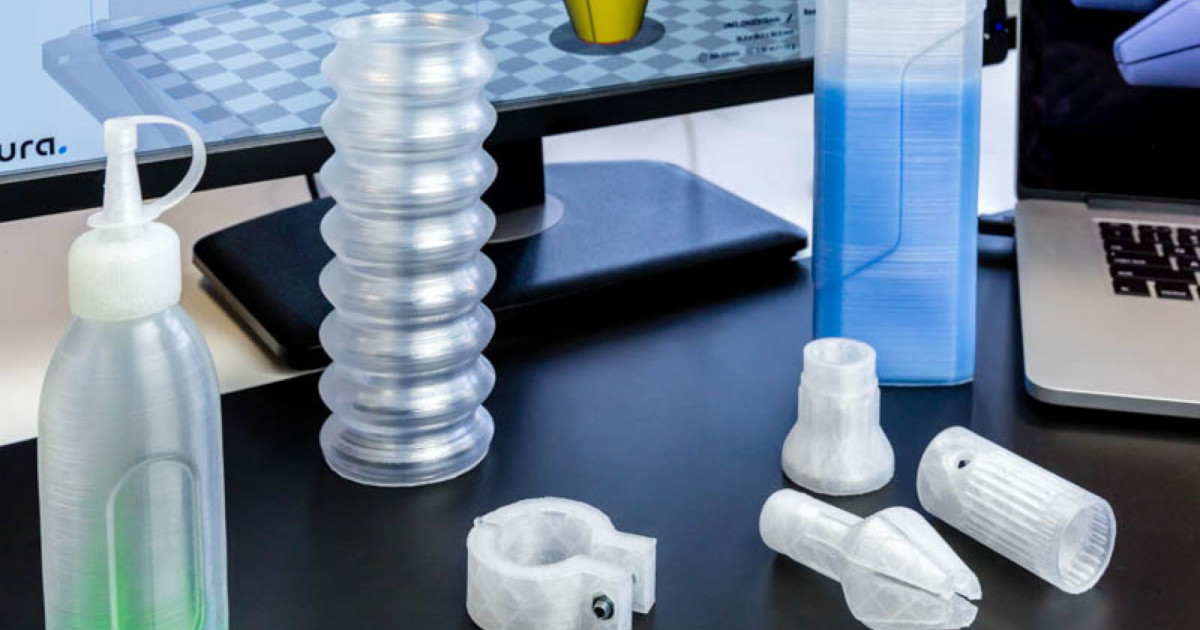
If you're serious about clarity, resin printers (SLA or DLP) are generally a much better starting point. They cure liquid resin with light, creating incredibly smooth layers and capturing fine details. There are specific "clear" or "transparent" resins available, and they can produce prints that are significantly closer to true clarity straight off the build plate.
However, even with resin, it's not a magic bullet. These prints often have a slight yellowish tint, especially after post-curing, and surfaces might still need a little love. But compared to FDM, you're definitely playing with a stronger hand here. Fancy stuff, eh?
The Secret Sauce: Post-Processing is Your New Best Friend
This is where the magic (and often, the most effort) happens. Whether you're using FDM or resin, if you want something truly clear, you're going to have to get hands-on. This is where good intentions meet reality.
Step 1: Sanding, Sanding, Sanding
For FDM prints, this is paramount. You need to progressively sand away those layer lines and surface imperfections. Start with a relatively coarse grit (like 200 or 400), then move up through the grits: 600, 800, 1000, 2000, and even higher. Wet sanding is often recommended to keep the plastic cool and prevent clogging your sandpaper.
The goal is to make the surface as perfectly smooth as possible. Each grit refines the scratches from the previous one, making them smaller and smaller until they're virtually invisible to the naked eye. Trust me, your arms will hate you, but the results can be quite satisfying.

Step 2: Polishing & Coating
Once you've sanded to the highest grit, it's time to polish. Use a plastic polishing compound and a soft cloth, or even a dremel with a polishing wheel. This step removes any remaining micro-scratches and brings out the shine.
Finally, to achieve that truly glass-like finish, many people apply a clear coat. This could be a spray-on clear lacquer, a brush-on clear epoxy resin, or even UV resin. The coating fills in any remaining microscopic imperfections and creates a perfectly smooth, uniform surface that light can pass through without scattering. This is often the step that makes the biggest difference, especially for FDM prints.
Setting Expectations: Not All Clarity Is Created Equal
It's important to understand what you're aiming for. Are you hoping to print a perfect optical lens? That's going to be incredibly difficult and likely require specialized industrial equipment. Are you looking for a clear case for an electronics project, or a transparent prop piece? That's much more achievable with the right materials and post-processing.

The journey from opaque to translucent to truly transparent is a spectrum. Most hobbyists will find it relatively easy to get to translucent, but achieving true optical clarity takes significant effort, time, and experimentation. What's your goal?
The Verdict: Is It Worth It?
So, can you 3D print clear plastic? Absolutely! Will it be as easy as printing a simple, opaque gadget? No way, José. It requires dedication, a willingness to learn new post-processing techniques, and a hefty dose of patience.
But when you finally hold that perfectly clear, 3D printed object in your hand – knowing all the effort that went into it – it's an incredibly rewarding feeling. It pushes the boundaries of what you thought your humble 3D printer could do. So, go forth and experiment! What transparent wonders will you create?